
পরিবারের রিপোর্টFamily reports
যা করবেন
পরিবারের কারো সাথে যুক্ত হয়ে রিপোর্ট শেয়ার করবেন।You'll connect with someone in your family and share reports.
স্টেপ বাই স্টেপ
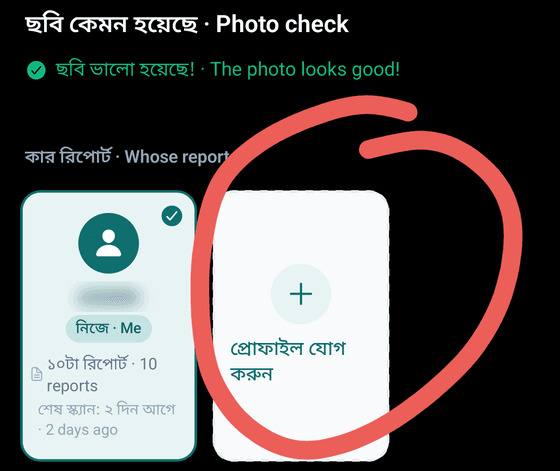
বাবা-মা বা সন্তানের রিপোর্ট স্ক্যান করলে এই রিপোর্টটা কার? · Whose report is this?-এ তাকে বেছে নিন; না থাকলে প্রোফাইল যোগ · Add profile চাপুন।Scanning a parent's or child's report? Under Whose report is this?, pick them, or tap Add profile.
হোমের শর্টকাট থেকে পরিবার চাপুন।In the Home shortcuts, tap Family.
ইনভাইট করুন · Invite family চাপুন।Tap Invite family.
ওনার ফোন নম্বর · Phone number লিখে আপনার কে হন · Relationship বেছে নিন, তারপর ইনভাইট · Invite চাপুন।Enter their Phone number, choose the Relationship, then tap Invite.
উনি নিজের ফোনে HBD খুলে হ্যাঁ · Accept চাপলে আপনারা যুক্ত হবেন।When they open HBD on their phone and tap Accept, you're connected.
কোনো রিপোর্ট খুলে শেয়ার · Share চাপুন, তারপর যাকে পাঠাবেন তার নামে চাপুন।Open a report, tap Share, then tap the name of the person to send it to.
পরিবার যা পাঠিয়েছে, দেখুন আমাকে শেয়ার করা · Shared with me-তে।Reports your family sent you are in Shared with me.
টিপস
- ফ্রি ট্রায়াল আর ফ্যামিলি প্যাকে নিজের আর পরিবারের মোট ৪টা প্রোফাইল, প্রত্যেকের রিপোর্ট আলাদা। স্ক্যান আর প্রশ্নের সীমা পুরো অ্যাকাউন্টের।The free trial and the Family pack hold up to 4 profiles (you and family), each with their own records. Scan and question limits are for the whole account.
- পরিবারের সাথে শেয়ার সবার জন্য ফ্রি।Sharing with family is free for everyone.
- কে কী পারবে, অনুমতি · Permissions-এর পাশে বদলান · Edit চেপে ঠিক করুন।Choose what each person can do: tap Edit next to Permissions.
- আপনি না চাইলে কোনো রিপোর্ট কারো কাছে যায় না।No report goes to anyone unless you send it.