
Scan a report or prescription
What you'll do
You'll take a clear photo of a report and upload it to HBD.
Step by step
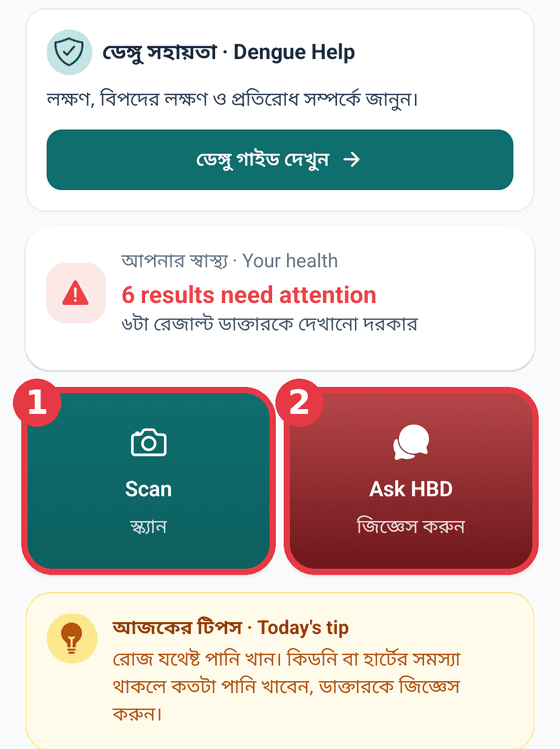
On the Home screen, tap the big Scan button.
Fit the whole page in the frame and Hold still: the photo takes itself.
Or take it yourself (Tap to take photo), or pick an earlier photo from your gallery.
On Check the photo, make sure the writing is clear.
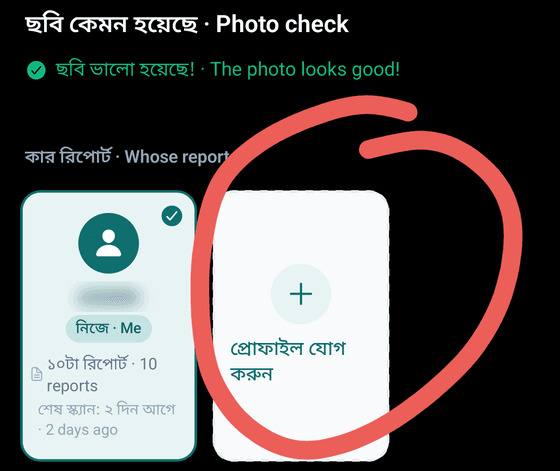
Under Whose report is this?, choose the right person.
Tips
Choose the right person before you scan. A parent's report saved under your name makes your health records and the Coach's advice wrong. Not on the list? Tap Add profile. The free trial and the Family pack hold up to 4 profiles (you and family), each with their own records. Scan and question limits are for the whole account.
If it's blurry, tap Retake. If it looks good, tap Upload.
While it shows AI is reading your report..., wait a little: about 1 minute for a report, 2–3 minutes for an X-ray, ultrasound or CT.
Tips
- Get the whole page in the frame, corners included.
- Use good light. Daylight is best.
- Keep the phone still. A shaky hand blurs the writing.
- No glare: tilt the phone a little away from lights and shiny paper.
- One page at a time. Scan a long report page by page.
- No internet? The report is saved on the phone and sent when you're back online.