
All guides
Medicine and check reminders
What you'll do
You'll set reminders for medicine, blood pressure, blood sugar or a walk, for you or a parent. They ring like an alarm.
Step by step
Tap the gold bell at the top of Home to open রিমাইন্ডার · Reminders.
For a parent, pick their profile at the top first.
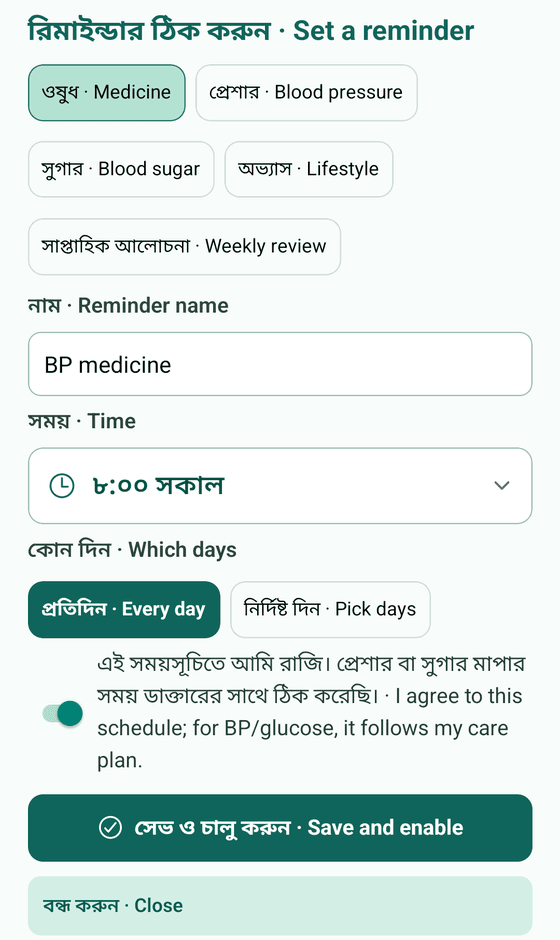
Tap Add reminder, then choose Medicine, Blood pressure, Blood sugar or Lifestyle.
Give it a name, pick the time on the clock, then choose Every day or Pick days.
When it rings, tap Taken, or Snooze 10 min to be reminded again.
To check it rings, tap Test reminder.
Tips
- Reminders ring even when the app is closed.
- On Xiaomi, Oppo, Vivo or Samsung phones, turn battery saving off for HBD or reminders may come late.
- Want a different sound? On Android, tap Change ringtone.
- Reminders follow your phone's clock. They are not for emergencies, and the dose is always what your doctor said.